
AI GBP Audit PRO
See how your business appears in local search, then turn the findings into a practical plan to improve your Google Business Profile.
Open Small Business Studio →BETA · Both tools accept customer reports. Each completed report uses one credit.
Understand your profile. Then close the gaps.
Start with an audit or choose an existing audit to build an optimization plan for the same project.
AI GBP Audit PRO · BETA
Get a Claude-powered review of your Business Profile and local visibility, with practical findings and a PDF you can preview and download.
Create my audit →AI GBP Optimization PRO · BETA
Use a completed audit to compare named nearby competitors and get prioritized steps to close gaps and improve your profile.
Build my optimization plan →One credit for the audit; one additional credit if you build the optimization plan.
Tell us which business to review.
Enter the business name, city or location, and how customers are served. A website and Google Maps or Business Profile link can help identify the right business when you have them.

Choose your project
Keep the audit with the right business or client.
Enter business details
Choose storefront, service area, or both. Add optional links if available.
Review the report
See the run status and any completed deliverables in your private workspace.
If the business cannot be identified confidently, you can add detail.
The audit may ask for clearer identifying information when multiple locations or similar businesses appear. An incomplete run returns its report credit so you can review the details before starting again.
Improve local visibility with named competitor insights.
After a completed AI GBP Audit PRO, AI GBP Optimization PRO uses that audit to name nearby competitors, compare their offerings, and map 30 days of local visibility improvements. No business details to enter again.

Finish your profile audit
A completed or partial audit supplies the research snapshot for this report.
Choose that audit
Select an eligible audit in the same project. The competitive report is a separate one-credit run.
Review the plan
Download the named competitor comparison and 30-day plan for human review.
See what your Business Profile audit delivers.
AI GBP Audit PRO answers “Where does my business stand?” These pages from an actual small business report show the score, priority findings and local market benchmarks you can use to decide what to improve first.
Know your starting point
See an overall GrowthGary score and the areas contributing to it.
Focus your effort
Separate priority gaps from strengths worth maintaining.
Get local context
Compare your public profile with researched businesses in your market.
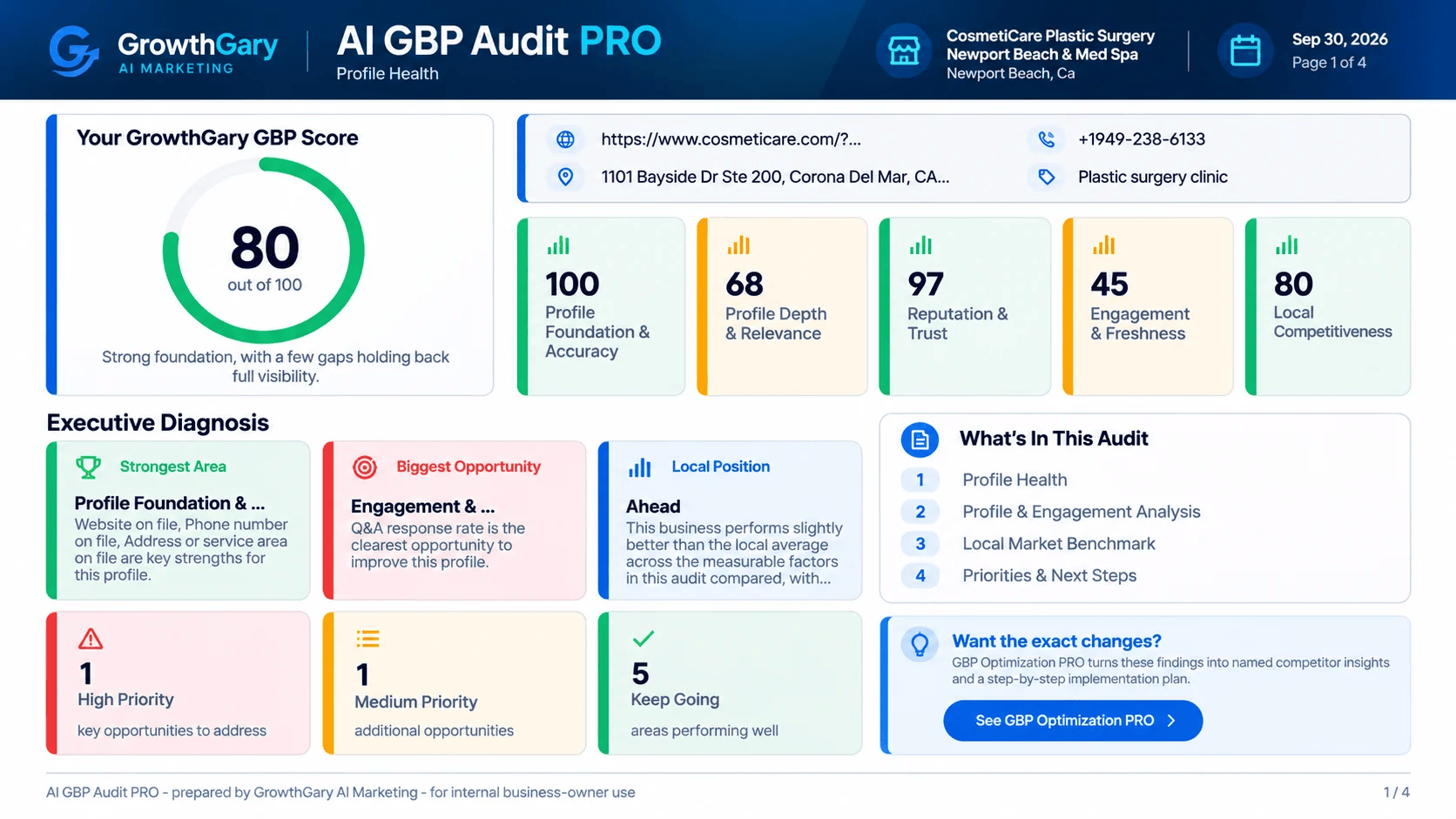
Your score, strengths and first priorities
This audit example shows an 80/100 GrowthGary score. Its category breakdown reveals why a strong profile can still have room to improve—especially engagement and freshness.
See where you stand in your local market
The benchmark page compares reviews, profile completeness, categories, services and photos with researched comparable local businesses. You can see which strengths to maintain and which gaps deserve attention.

How to use your audit
Start with the highest-priority findings, review the supporting evidence, and confirm your business details before making changes. Use the benchmark to see where your profile is ahead or has room to improve. Keep the report as your starting point for a future audit.
Audit sample: CosmetiCare, Newport Beach. The optimization example below is from a different business. These are sample report pages; your findings depend on your business and the public information available.
Create my Business Profile audit →See the gaps. Know what to do next.
AI GBP Optimization PRO builds on your eligible audit to answer “What should I change?” It adds named competitor comparisons, specific profile recommendations and a 30-day implementation roadmap.
See your opportunities
Understand which profile improvements deserve attention first.
Learn from local competitors
Review the visible differences behind the comparison.
Work through a plan
Use the full report’s recommendations and roadmap to organize your next steps.
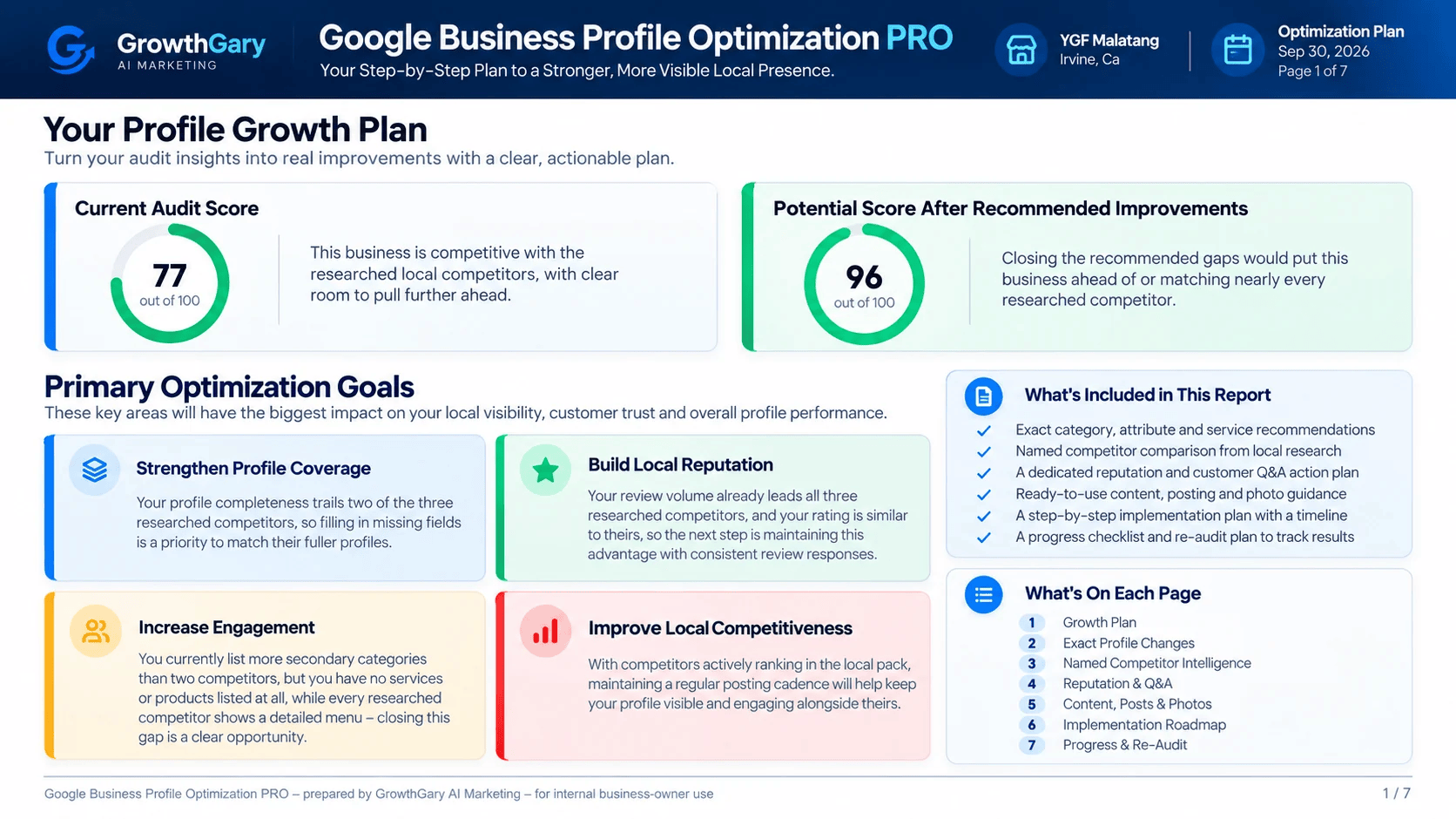
Turn audit findings into specific improvements
This optimization example starts at 77/100 and identifies profile coverage, reputation, engagement and competitive priorities. The potential score helps illustrate the opportunity behind the recommendations.
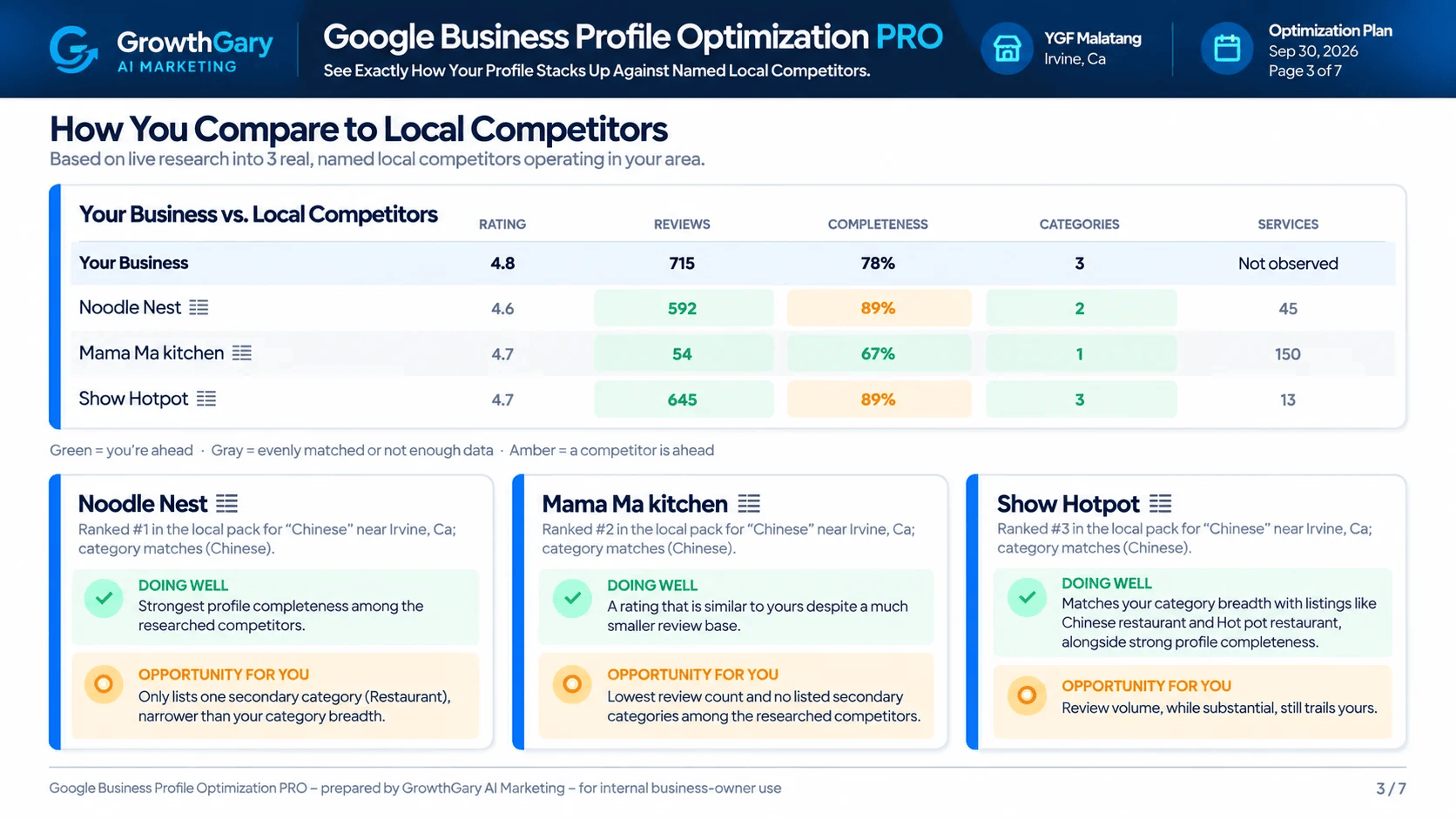
Understand what nearby competitors do differently
A side-by-side comparison names three local competitors and shows their ratings, reviews, profile completeness, categories and services. The accompanying findings explain what each does well and where your business has an opportunity.
Optimization sample: YGF Malatang, Irvine. The potential score is an estimate based on recommended improvements, not a promised ranking, traffic or sales result. The screenshots show selected pages from the full report.
How to use your optimization plan
Review the recommended categories, services and profile changes for accuracy. Then work through the full report’s reputation, Q&A, content and photo guidance using its implementation roadmap. Share the plan with your team or agency, track the changes you make, and re-audit later to measure progress.

How GrowthGary works
Only the context the job needs.
Live/public research where current information matters.
A purpose-built process for each report or tool.
AI is used for analysis, synthesis or creation where it adds value.
A report, plan or deliverable designed for action.
Choose credits for your Business Profile work.
Each report uses one credit. Your credits work across available GrowthGary tools.
Start with an audit.
Buy 1 CreditReview your Business Profile, then build a named competitor comparison and optimization plan.
Buy 2 CreditsKeep credits ready for more projects.
Buy 10 CreditsReady to review a local business?
Choose an audit or optimization plan in Small Business Studio. Your report history stays with your project.
Open Small Business Studio →