
Video has always been one of marketing’s most effective formats—and one of its most demanding.
A simple two-minute video can require a script, camera, microphone, lighting, editing, captions, graphics, music, approvals, and someone willing to appear on camera without looking as though they’ve been taken hostage by the content team.
AI video tools are changing that process.
They can generate clips from text, create digital presenters, remove filler words, produce captions, translate speech, clean audio, build storyboards, and turn long recordings into short social content.
That doesn’t mean every company should replace its video team with a prompt box. It means marketers now have faster ways to create, edit, and repurpose video—provided they understand where AI helps and where human judgment still matters.
TL;DR
What it is: AI video is the use of artificial intelligence to generate, edit, enhance, translate, or repurpose video content.
Who it’s for: Marketers, creators, agencies, educators, sales teams, publishers, and businesses producing video regularly.
Biggest takeaway: AI video works best for speeding up production and repetitive editing—not for replacing strategy, storytelling, or brand judgment.
Gary’s opinion: Start with editing, captions, transcription, and repurposing before attempting fully generated brand videos. The practical uses usually deliver value faster than the cinematic ones.
What Does AI Video Mean?
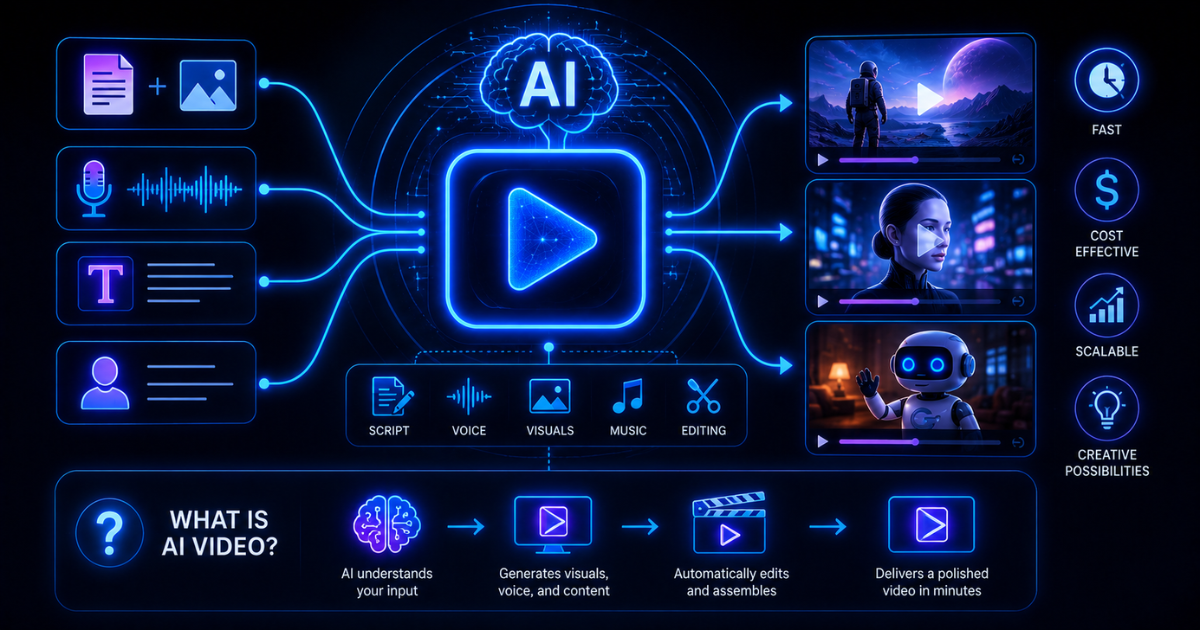
AI video refers to software that uses artificial intelligence during one or more stages of video production.
Depending on the platform, AI video tools can:
- Generate video from a written prompt
- Turn a script into scenes
- Create digital presenters or avatars
- Edit video through a transcript
- Remove pauses and filler words
- Improve audio quality
- Add captions automatically
- Translate speech and synchronize lips
- Create short clips from longer recordings
- Remove or replace backgrounds
- Generate B-roll
- Produce voiceovers
- Resize videos for different platforms
AI video includes both generative and assistive tools.
Generative AI creates new visuals, voices, scenes, or presenters.
Assistive AI improves existing footage by editing, transcribing, cleaning, translating, or repurposing it.
For most marketers, assistive AI is currently the more reliable place to begin.
How Does AI Video Work?
AI video systems use machine-learning models trained to interpret text, images, audio, movement, and visual patterns.
The workflow usually starts with one of four inputs.
Text-to-video
A user enters a description, such as:
Create a short video of a small marketing team reviewing campaign performance in a modern office.
The platform generates a clip based on the prompt.
More detailed prompts may specify:
- Camera movement
- Lighting
- Visual style
- Scene composition
- Subject behavior
- Duration
- Aspect ratio
- Mood
Image-to-video
A still image becomes the starting frame for an animated clip.
The system may add movement to:
- A person
- A product
- A landscape
- A camera angle
- Background elements
This can be useful for campaign visuals and concept testing, though the results need careful review for unnatural motion.
Script-to-video
Some platforms turn a script into a complete first-pass video using:
- Stock footage
- Generated scenes
- Narration
- Captions
- Music
- Digital presenters
This is commonly used for tutorials, training videos, product explainers, and internal communication.

AI-assisted editing
Editing platforms analyze existing video and automate repetitive production work.
Common features include:
- Transcript-based editing
- Silence removal
- Audio enhancement
- Caption generation
- Speaker detection
- Clip selection
- Reframing
- Background cleanup
This is where AI often produces the clearest immediate return.

What Is AI Video Best Used For?
Repurposing long-form content
A webinar, interview, podcast, or presentation can be transformed into:
- Short social clips
- YouTube segments
- Promotional teasers
- Captioned excerpts
- Email content
- Sales enablement videos
AI can identify likely highlights, generate captions, and resize clips for different platforms.
Human review is still needed. The machine may identify the loudest moment rather than the most useful one.
Editing interviews and podcasts
Transcript-based platforms allow marketers to remove sentences by deleting text.
That makes it much easier to edit:
- Interviews
- Podcasts
- Talking-head videos
- Webinars
- Tutorials
- Customer stories
AI can also clean audio, remove filler words, and shorten pauses.
Training and educational videos
Digital presenters and script-to-video tools can produce repeatable instructional content without requiring a new recording session for every update.
This is useful for:
- Employee onboarding
- Product education
- Internal training
- Course content
- Software tutorials
The format is efficient, though fully synthetic presenters may feel less personal than a real expert.
Translation and localization
AI video platforms can translate speech, generate subtitles, produce voiceovers, and sometimes adjust lip movement.
That can help businesses adapt video for several markets without reshooting the entire production.
Rapid concept development
Marketers can create rough storyboards, sample scenes, and campaign concepts before committing to a full production budget.
This helps teams evaluate ideas early.
Where AI Video Still Struggles
Consistency
Generated characters, objects, clothing, and backgrounds can change unexpectedly from one shot to another.
A person may enter a scene wearing a blue shirt and leave five seconds later as someone’s slightly concerned cousin.
Precise control
AI-generated footage can be difficult to direct at the level required for a polished commercial.
Specific product details, branded elements, and complex movements may be inconsistent.
Authenticity
Customer stories, executive messages, interviews, and emotionally important content often work because real people are present.
A synthetic presenter may communicate information efficiently without creating the same degree of trust.
Legal and reputational risk
Businesses should consider:
- Consent
- Likeness rights
- Voice cloning
- Copyright
- Music licensing
- Disclosure
- Platform terms
- Deepfake concerns
AI-generated video should not create confusion about whether a real person said or did something.
AI Video vs Traditional Video Production
| Task | Traditional production | AI-assisted production |
|---|---|---|
| Scripting | Human-written | AI draft with human editing |
| Recording | Camera, presenter, studio | Real footage, avatar, or generated scene |
| Editing | Manual timeline editing | Transcript and AI-assisted editing |
| Captions | Manual or outsourced | Automatically generated |
| Localization | Separate recordings or dubbing | AI translation and voice generation |
| Repurposing | Manual clip selection | Automated highlight suggestions |
| Creative control | High | Variable |
| Production speed | Slower | Often faster |
The strongest workflow usually combines both.
Traditional production provides authenticity, control, and storytelling. AI reduces repetitive labor and speeds up adaptation.
How Marketers Should Use AI Video
A practical workflow looks like this:
1. Define the goal
Decide whether the video should educate, generate awareness, support sales, explain a product, or improve retention.
2. Choose the right production approach
Use real footage when trust and personality matter.
Use AI-generated or avatar content when repeatability and speed matter more.
3. Create a strong script
AI can help draft the script, but a human should ensure the message is accurate, natural, and aligned with the audience.
4. Produce a first version
Use AI for editing, captions, cleanup, B-roll ideas, or scene generation.
5. Review every detail
Check:
- Facts
- Visual continuity
- Captions
- Pronunciation
- Brand elements
- Licensing
- Accessibility
- Disclosure requirements
6. Measure performance
Useful metrics include:
- Watch time
- Completion rate
- Click-through rate
- Engagement
- Leads or conversions
- Production cost
- Editing time
- Number of reusable assets produced
The point is not merely to make video faster. It is to make useful video more efficiently.
Choosing an AI Video Tool
Different categories solve different problems.
| Tool category | Best for |
|---|---|
| Transcript-based editors | Podcasts, interviews, tutorials, and repurposing |
| Text-to-video generators | Concept scenes and generated footage |
| Avatar platforms | Training, presentations, and repeatable explainers |
| Social clipping tools | Turning long recordings into short content |
| Professional editing suites | Advanced production with AI assistance |
| Translation platforms | Multilingual localization and dubbing |
Popular platforms include Descript and other tools focused on generation, avatars, editing, clipping, and localization.
Before subscribing, consider:
- Production quality
- Editing control
- Export limits
- Watermarks
- Generation credits
- Commercial-use rights
- Collaboration
- Brand controls
- Whether the tool duplicates software you already own
Gary’s Take
If I were building an AI video workflow today, I’d begin with existing footage.
I’d use AI to transcribe it, clean the audio, remove filler words, generate captions, find strong clips, and create versions for different channels.
That workflow solves a real production problem without requiring the AI to invent an entire believable universe from scratch.
I’d use generated video for concept development, simple supporting visuals, and lower-risk content. I’d keep important brand messages, customer stories, and executive communication grounded in real people whenever possible.
AI video should help you tell the story.
It shouldn’t become the story.
Pros and Cons of AI Video
Pros
- Speeds up editing
- Makes repurposing easier
- Reduces production barriers
- Supports multilingual content
- Automates captions and transcription
- Helps small teams produce more video
Cons
- Generated visuals can be inconsistent
- Authenticity may suffer
- Licensing and likeness issues require care
- Output often needs substantial review
- Credit-based pricing can become expensive
- Advanced storytelling still requires people
Verdict
AI video is best for marketers who need to edit, repurpose, localize, or produce repeatable video content more efficiently.
It is less reliable as a complete replacement for professional production when the work requires precise visual control, emotional storytelling, authentic human presence, or high brand risk.
My recommendation is to start with practical AI-assisted editing. Expand into generated video only when the use case clearly benefits from it.
Frequently Asked Questions
What is AI video in simple terms?
AI video is the use of artificial intelligence to create, edit, enhance, translate, or repurpose video content.
How is AI used in video production?
AI can generate scenes, edit transcripts, remove background noise, create captions, translate speech, produce avatars, and identify short clips.
Can AI create a complete video?
Yes. Some platforms can generate scenes, narration, presenters, captions, and music from a script, although the result still requires human review.
Can AI video replace video editors?
AI can automate routine editing, but professional editors remain important for storytelling, pacing, visual judgment, and final quality.
What is the best AI video tool?
The best tool depends on the task. Transcript editors are ideal for existing footage, while generators and avatar tools are better for synthetic production.
Is AI-generated video safe for commercial use?
Commercial rights vary by platform and source material. Review licensing, likeness, music, voice, and disclosure requirements before publishing.
How can marketers use AI video?
Marketers can use it for social clips, webinars, tutorials, product explainers, training, localization, campaign concepts, and content repurposing.
Related Articles
- Best AI Video Tools
- Choosing an AI Video Tool
- AI Video Best Practices
- Video Production Workflows
- Descript Review
Building a smarter marketing stack isn’t about buying more tools—it’s about choosing the right ones.
That’s the kind of growth I like.
— Gary
The changes actually worth knowing
A short briefing that filters the noise into useful AI, marketing, technology, tools, and ideas for marketers and businesses.