
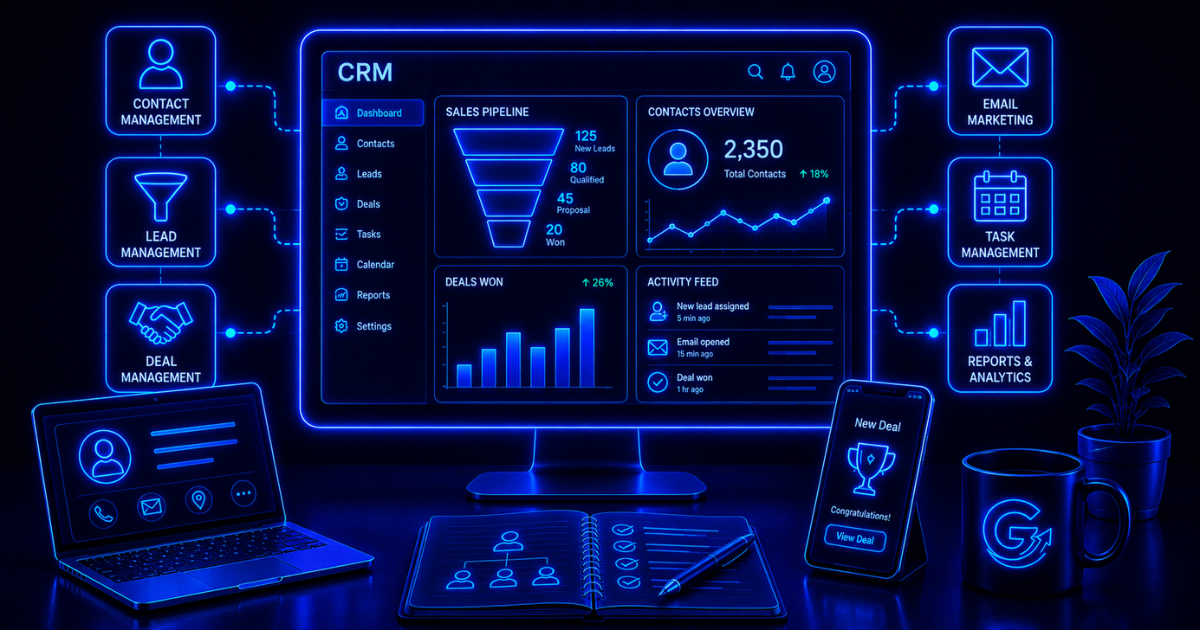
CRM software is a system businesses use to organize customer and prospect information, track interactions, manage sales activity, and maintain relationships over time. (source)
Quick answer
CRM stands for Customer Relationship Management. CRM software centralizes customer and prospect information, tracks conversations, pipeline stages, tasks, and next steps, and helps teams coordinate follow-up. It becomes useful when inboxes, spreadsheets, and memory are no longer reliable—but it does not replace a clear process or consistent team adoption.
At the simplest level, CRM software helps answer questions like:
- Who is this customer?
- When did we last talk to them?
- What are they interested in?
- Where are they in the sales process?
- Who on the team owns the relationship?
- What should happen next?
Without a CRM, that information often ends up scattered across inboxes, spreadsheets, notes, calendars, and people’s memories.
That works right up until it doesn’t.
CRM software can be simple or extremely sophisticated. A small business may only need contact records and a basic pipeline. A larger company may use CRM software for sales forecasting, marketing automation, customer service, lead scoring, reporting, and complex account management.
The right system depends on the work you actually need it to manage.
What Does CRM Stand For?
CRM stands for Customer Relationship Management.
The term refers both to the business practice of managing customer relationships and to the software used to support that process.
So when someone says:
We need a CRM.
they usually mean:
We need software to organize and manage our customer and prospect relationships.
That software becomes a central place for information about people, companies, deals, conversations, and next steps.
What Does CRM Software Do?
CRM software helps businesses keep customer-related information organized and usable.
Common functions include:
- Contact management
- Lead management
- Sales pipeline tracking
- Deal tracking
- Task and follow-up management
- Email logging
- Customer history
- Sales forecasting
- Reporting
- Marketing integration
- Workflow automation
- Customer service
Not every CRM includes all of these.
Some are built primarily for sales teams.
Others combine sales, marketing, service, and automation into a broader platform.
How Does CRM Software Work?
CRM software works by creating a central record for each customer, lead, account, or opportunity.

Imagine someone fills out a contact form on your website.
A CRM might create a record containing:
- Name
- Company
- Phone number
- Lead source
- Product interest
- Notes
- Assigned salesperson
As the relationship develops, the CRM can also record:
- Emails
- Calls
- Meetings
- Form submissions
- Website activity
- Sales opportunities
- Quotes
- Purchases
- Support issues
Instead of searching through five systems to understand what’s happening, the team has one place to look.
A typical flow might be:
Lead enters → CRM record created → salesperson assigned → activity tracked → deal progresses → customer record maintained
CRM software becomes more valuable as the number of relationships grows.
What Information Does a CRM Store?
The exact information depends on the platform and business.
Common CRM data includes:

Contact Information
- Name
- Phone number
- Job title
- Address
Company Information
- Company name
- Industry
- Size
- Website
- Location
Sales Information
- Deal value
- Sales stage
- Expected close date
- Products or services
- Opportunity owner
Activity History
- Emails
- Calls
- Meetings
- Notes
- Tasks
Marketing Information
- Lead source
- Campaign activity
- Form submissions
- Content downloads
- Email engagement
Customer Information
- Purchases
- Subscription status
- Renewal dates
- Support history
The goal isn’t to collect every possible piece of information.
It’s to collect the information that helps the business manage the relationship better.
What Is Contact Management?
Contact management is one of the most basic CRM functions.
It keeps information about customers and prospects organized in individual records.
Before CRM software, this was often handled through:
- Rolodexes
- Address books
- Spreadsheets
- Email contacts
- Shared documents
A CRM gives the contact record more context.
Instead of only knowing:
Jane Smith
jane@example.com
you might know:
Jane Smith
Marketing Director
Downloaded pricing guide
Attended webinar
Open opportunity: $18,000
Last call: Tuesday
Follow-up due Friday
That’s considerably more useful.
What Is a CRM Sales Pipeline?
A CRM sales pipeline shows where potential deals are in the sales process.
A simple pipeline might include:
New Lead → Qualified → Discovery → Proposal → Negotiation → Won / Lost
Each opportunity moves through those stages.
That helps sales teams answer questions such as:
- How many active deals do we have?
- Which deals are stalled?
- What’s likely to close this month?
- Who needs follow-up?
- What’s the potential value of the pipeline?
A CRM doesn’t create the sales process.
It helps organize and manage it.
If the sales process itself is chaotic, putting it into expensive software just creates a well-organized version of the chaos.

CRM Software vs. Marketing Automation
CRM software and marketing automation overlap, but they solve different problems.
CRM software primarily manages customer and prospect relationships. Marketing automation automatically executes marketing activities based on data, triggers, or behavior.
| CRM Software | Marketing Automation |
|---|---|
| Stores contact data | Runs automated campaigns |
| Tracks sales activity | Nurtures leads |
| Manages opportunities | Segments audiences |
| Tracks relationship history | Sends triggered messages |
| Supports sales teams | Supports marketing workflows |
| Records customer activity | Responds automatically to activity |
The two frequently work together.
For example:
Lead downloads guide → marketing automation nurtures lead → engagement increases → CRM updates → salesperson receives notification
Some platforms combine both functions in the same ecosystem.
HubSpot and ActiveCampaign are examples of platforms where CRM and marketing automation can overlap significantly. (source)
If you want the automation side in more depth, Growth Gary’s guide to what marketing automation is covers that separately.
CRM Software vs. Email Marketing
Email marketing software is designed primarily for managing subscriber communication.
CRM software is designed primarily for managing customer and prospect relationships.
An email platform might track:
- Subscribers
- Campaigns
- Opens
- Clicks
- Email sequences
A CRM might track:
- Leads
- Opportunities
- Sales activity
- Customer history
- Account ownership
- Tasks
Modern platforms increasingly blur that distinction.
Some CRMs include email marketing.
Some email platforms include CRM features.
If email is the main thing you’re trying to understand, start with Growth Gary’s guide to what email marketing is.
CRM Software vs. Spreadsheet
A spreadsheet can work surprisingly well when a business is small.
You might have columns for:
Name | Company | Email | Stage | Last Contact | Next Step
There’s nothing wrong with that.
A CRM becomes more valuable when the spreadsheet starts failing because:
- Multiple people need access
- Activity needs to be tracked
- Follow-ups are being missed
- Data lives in several systems
- Lead volume increases
- Sales stages become more complex
- Reporting becomes important
The difference isn’t that a CRM stores information and a spreadsheet doesn’t.
The difference is that CRM software is designed around relationships and workflows.
What Are the Main Types of CRM Software?
CRM platforms generally fall into a few broad categories.
Sales CRM
Sales CRMs focus on managing leads, deals, pipelines, and sales activity.
Common features include:
- Contact management
- Deal tracking
- Pipelines
- Tasks
- Forecasting
- Email tracking
Marketing CRM
Marketing-oriented CRM systems emphasize customer data, segmentation, campaigns, and lead nurturing.
They may include:
- Forms
- Segmentation
- Lead scoring
- Automation
- Campaign tracking
Customer Service CRM
Service-oriented CRM platforms help manage ongoing customer relationships after the sale.
Features might include:
- Support tickets
- Customer history
- Knowledge bases
- Service workflows
- Customer communication
All-in-One CRM Platforms
Some vendors combine sales, marketing, service, automation, and reporting.
That can simplify the software stack.
It can also become expensive or overly complex.
Don’t assume all-in-one is automatically better.
Sometimes specialized tools connected well together are the better system.
What Are the Benefits of CRM Software?
The value of CRM software comes from making customer information easier to use.
Better Organization
Customer information is stored in one place instead of scattered across multiple systems.
More Consistent Follow-Up
Tasks and reminders help reduce forgotten leads and missed opportunities.
Shared Customer History
Different team members can see what has already happened.
That prevents conversations like:
Did anyone ever follow up with this person?
Better Sales Visibility
Managers can understand pipeline volume, deal stages, and potential revenue.
Improved Collaboration
Marketing, sales, and customer service can work from shared information.
Better Automation
CRM events can trigger actions.
For example:
Deal moves to Won → onboarding workflow begins
This is where CRM increasingly overlaps with workflow automation.
Better Reporting
A CRM can help answer:
- Where do leads come from?
- Which salesperson closes the most business?
- What’s the average deal size?
- How long does the sales cycle take?
- Which opportunities are most likely to close?
Better information doesn’t guarantee better decisions.
But it gives you a better chance.
What Are the Limitations of CRM Software?
CRM software doesn’t automatically improve customer relationships.
It can help.
But the system still depends on people and processes.
Bad Data Creates a Bad CRM
If records are incomplete or inaccurate, the CRM becomes unreliable.
Teams May Not Use It
This is probably the most common CRM problem.
A business buys sophisticated software.
Then salespeople continue keeping their real notes somewhere else.
Now the company has:
CRM data + actual data
Not ideal.
Complex CRMs Require Maintenance
Fields, pipelines, automation, integrations, permissions, and reports need ongoing management.
More Features Can Create More Complexity
A platform with 900 features isn’t inherently better than one with 40.
If you only use 12 of them, you may be paying for complexity.
CRM Software Can’t Fix a Weak Sales Process
The CRM records the process.
It doesn’t magically create one.
What Businesses Need CRM Software?
CRM software becomes useful when maintaining customer relationships manually starts creating problems.
Common users include:
- B2B companies
- Professional services firms
- SaaS companies
- Agencies
- Real estate businesses
- Financial services
- Healthcare organizations
- Ecommerce businesses
- Local service companies
- Sales teams
But not every business needs one immediately.
If you have five customers and one salesperson, a spreadsheet may be enough.
If you have hundreds of leads, multiple salespeople, recurring follow-up, and information spread across several tools, a CRM can become much more valuable. (source)
What CRM Features Should You Look For?
Start with your actual requirements.
Useful CRM features can include:
| Feature | Why It Matters |
|---|---|
| Contact management | Keeps customer data organized |
| Pipeline management | Tracks deals through sales stages |
| Email integration | Connects communication history |
| Task management | Keeps follow-ups from being missed |
| Reporting | Measures pipeline and sales activity |
| Automation | Reduces repetitive work |
| Lead scoring | Helps prioritize prospects |
| Forms | Captures leads directly |
| Marketing integration | Connects campaigns and sales |
| Mobile access | Supports teams away from desks |
| Integrations | Connects other business systems |
| Permissions | Controls who can access information |
Don’t choose software based on the biggest feature checklist.
Choose it based on the workflow you need to manage.
What Are Some Examples of CRM Software?
Well-known CRM platforms include:
- HubSpot
- Salesforce
- Pipedrive
- Zoho CRM
- ActiveCampaign
- monday CRM
- Freshsales
- Keap
- Attio
- Brevo
They serve different types of users.

Some are better for small businesses.
Others are designed for enterprise sales operations.
Some emphasize ease of use.
Others provide deep customization.
Growth Gary’s best CRM software for marketing guide covers the software comparison side in more detail.
This article is about understanding what CRM software is.
That one is for choosing one.
What Is CRM Automation?
CRM automation uses rules or workflows to perform repetitive tasks inside or around the CRM.
Examples include:
- Assigning new leads
- Creating follow-up tasks
- Updating lifecycle stages
- Sending notifications
- Moving deals
- Triggering emails
- Synchronizing data
For example:
New lead → CRM record created → owner assigned → task created → notification sent
That workflow doesn’t necessarily require AI.
It’s simply automation.
More sophisticated systems may combine CRM automation with AI.
How Is AI Used in CRM Software?
AI is increasingly being built into CRM platforms. (source)
Potential uses include:
- Writing emails
- Summarizing customer interactions
- Lead scoring
- Forecasting
- Identifying next steps
- Analyzing conversations
- Generating account summaries
- Recommending actions
- Categorizing leads
- Automating data entry
AI can be particularly useful because CRM systems contain large amounts of relationship data.
Instead of manually reviewing 30 past interactions before a meeting, AI may summarize what’s most important.
But AI doesn’t make clean CRM data optional.
It makes bad data easier to process quickly.
That’s not the same thing as making it useful.
CRM Software and AI Automation
CRM software is one of the most common places to use AI automation.
For example:
Lead enters CRM → AI analyzes inquiry → lead classified → salesperson assigned → account summary created → follow-up drafted
That’s more advanced than simple CRM automation because AI is interpreting information inside the workflow.
Growth Gary’s guide to what AI automation is explains that distinction in more detail.
How Much Does CRM Software Cost?
CRM pricing varies widely.
Some platforms offer free plans.
Others charge:
- Per user
- Per month
- Per contact
- By feature tier
- By sales or marketing package
Enterprise CRM implementations can become expensive once you include:
- Licenses
- Setup
- Customization
- Integrations
- Training
- Consulting
- Administration
The sticker price isn’t the only cost.
A complicated CRM also requires time.
For small teams, simplicity often has real economic value.
How Do You Choose CRM Software?
Start with the process, not the product.

1. Define What You Need to Manage
Are you primarily managing:
- Leads?
- Sales opportunities?
- Customer relationships?
- Marketing campaigns?
- Support?
2. Map Your Sales Process
Write down your actual stages.
Don’t let software dictate a process that doesn’t fit your business.
3. Identify Required Features
Separate:
Must-have
from:
Nice-to-have
This prevents feature creep.
4. Check Integrations
The CRM may need to connect with:
- Calendar
- Website
- Forms
- Marketing automation
- Ecommerce
- Accounting
- Customer service
5. Consider Adoption
Ask:
Will the team actually use this?
This matters more than whether the software has advanced forecasting on page 37 of the feature list.
6. Test the Real Workflow
Don’t only watch a demo.
Create:
- A lead
- A deal
- A task
- A report
- An automation
See how the actual process feels.
How Do You Measure CRM Success?
A CRM should improve the management of customer relationships and the processes around them.
Useful measures include:
| Metric | What It Tells You |
|---|---|
| Lead response time | How quickly leads receive attention |
| Follow-up completion | Whether opportunities are being managed |
| Conversion rate | How often leads become customers |
| Sales cycle length | How long deals take |
| Pipeline value | Potential revenue |
| Win rate | Percentage of opportunities won |
| Data completeness | Whether records are usable |
| CRM adoption | Whether the team actually uses the system |
| Forecast accuracy | Whether sales projections improve |
If the CRM creates more administrative work without improving visibility or follow-up, something is wrong.
Common CRM Mistakes
CRM problems are often process problems wearing software clothing.
Buying Before Mapping the Process
Don’t shop first.
Understand the workflow first.
Adding Too Many Fields
Every field seems useful during setup.
Then users see 83 required fields and stop entering data.
Collect what matters.
Over-Customizing
Customization can make a CRM fit your business.
Too much customization can make it impossible to maintain.
Ignoring User Adoption
If the team hates using the CRM, the data will deteriorate.
Automating Too Early
Get the core process working before building elaborate workflows.
Treating the CRM as a Database Instead of a System
A CRM should help the team act.
It’s not just a place where customer information goes to sit quietly.
Gary’s Take: The Best CRM Is the One Your Team Actually Uses
CRM comparisons can get absurdly complicated.
One platform has better reporting.
Another has better automation.
Another has more integrations.
Another has AI everywhere.
Fine.
But if your team avoids the software, none of those features matter.
If I were choosing a CRM for a smaller marketing or sales team, I’d prioritize:
Ease of use → core workflow → integrations → automation → advanced features
in roughly that order.
Start with the simplest system that solves the actual problem.
You can always grow into more sophistication.
Moving from a simple CRM to something more powerful is annoying.
Paying for a powerful CRM nobody uses is worse.
Is CRM Software Worth It?
CRM software is worth it when customer and prospect information becomes too important or too complex to manage reliably through spreadsheets, inboxes, and memory.
It becomes especially useful when:
- Multiple people manage relationships
- Lead volume is growing
- Sales follow-up matters
- Customer history needs to be shared
- Reporting becomes important
- Marketing and sales need to coordinate
- Automation can remove repetitive work
If your needs are still simple, stay simple.
A CRM should reduce friction.
Not become another system everyone has to manage.
FAQs About CRM Software
What is CRM software in simple terms?
CRM software is a system that stores customer and prospect information and helps businesses manage sales activity, communication, follow-up, and relationship history.
What does CRM stand for?
CRM stands for Customer Relationship Management.
What is an example of CRM software?
Examples include HubSpot, Salesforce, Pipedrive, Zoho CRM, ActiveCampaign, monday CRM, Freshsales, Keap, and Attio.
What is the main purpose of CRM software?
The main purpose of CRM software is to organize customer information and help businesses manage relationships, sales opportunities, and follow-up more consistently.
Is CRM software only for sales teams?
No. Marketing, customer service, account management, and other teams can also use CRM data. However, many CRM systems are heavily centered around sales processes.
Is CRM the same as marketing automation?
No. CRM software primarily manages customer and prospect information, while marketing automation automatically performs marketing activities. Many platforms combine both.
Can small businesses use CRM software?
Yes. Small businesses can use CRM software to manage leads, track sales, organize customer information, and automate routine follow-up. A simple CRM is often enough.
Do I need CRM software?
You probably need CRM software when customer information becomes difficult to manage reliably across spreadsheets, inboxes, and different team members. Very small businesses may be able to use simpler systems initially.
CRM software should make customer relationships easier to manage, not turn them into a software project.
Get the process right, keep the system simple, and choose a platform your team will actually use.
— Gary