
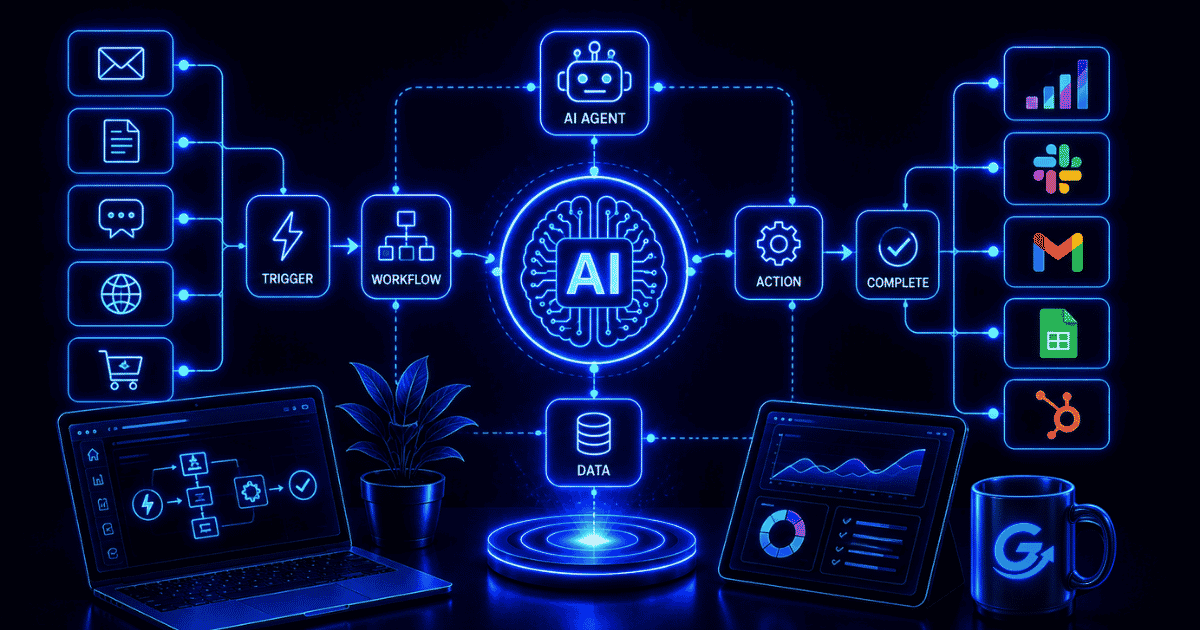
AI automation combines artificial intelligence with automated workflows so a system can interpret information, make a bounded decision, generate or transform content, and then trigger the next step. Traditional automation follows explicit rules. AI automation adds capabilities such as classification, extraction, prediction, language understanding, and generation where the inputs are too variable for a simple if-this-then-that rule.
The useful goal is not to put AI into every process. It is to choose the simplest reliable method for each step: deterministic rules where the answer is known, AI where interpretation is genuinely needed, and human approval where the consequence or ambiguity is too high.
TL;DR
AI automation is a workflow in which AI performs one or more judgment-oriented steps—such as reading a document, classifying a request, drafting a response, forecasting an outcome, or selecting a route—and software moves the work through the remaining process. Start with a stable workflow and measurable result. Keep rules deterministic where possible, limit permissions, validate outputs, add human checkpoints for consequential actions, and monitor quality, exceptions, time, and cost after launch.
What is AI automation?
AI automation is the use of artificial intelligence inside a process that runs with reduced manual effort. AI interprets or produces information; automation connects that capability to triggers, data, applications, approvals, and follow-up actions.
IBM describes intelligent automation as the combination of AI, business process management, and robotic process automation to streamline and scale decision-making across organizations (source). In practice, an AI-automated workflow might read an incoming document, extract the needed fields, classify the request, check business rules, create a draft response, send uncertain cases to a person, and update the system of record.
AI automation is broader than generative AI. A system can use machine learning for prediction, computer vision for image analysis, natural-language processing for classification, or generative models for drafting and summarization. The value comes from how that capability improves a complete process—not from the model in isolation.
How does AI automation work?
A production workflow normally combines deterministic and probabilistic steps. The deterministic layer manages triggers, permissions, routing, data movement, and business rules. The AI layer handles interpretation, prediction, or generation. Monitoring and human review help manage exceptions.
1. A trigger starts the workflow
The trigger may be a form submission, new email, uploaded document, scheduled time, CRM change, support ticket, sensor event, or API request. The workflow should define which event starts a run and how duplicate or incomplete events are handled.
2. The system gathers approved context
The automation retrieves the records, documents, instructions, policies, and prior activity needed for the task. Access should be limited to the minimum necessary data. Poor or stale context produces unreliable outputs even when the model is capable.
3. AI performs a bounded task
The AI may extract fields, classify intent, summarize evidence, predict a score, detect an anomaly, generate a draft, or recommend a route. The task should have a clear input, output format, confidence or validation method, and fallback behavior.

4. Rules validate and route the result
Deterministic checks can confirm required fields, allowed values, thresholds, policy conditions, and permissions. The workflow may then update a record, create a task, request approval, notify a person, or call another system.

5. Monitoring captures the outcome
Useful logs record whether the run succeeded, what exceptions occurred, how long it took, what it cost, and whether a person corrected the output. Monitoring the whole process is more valuable than measuring model accuracy without operational context.
AI automation vs. traditional automation, RPA, and AI agents
| Approach | How it works | Best fit |
|---|---|---|
| Traditional automation | Uses predefined triggers, conditions, and actions | Stable processes with clear rules |
| Robotic process automation | Software bots reproduce repetitive user-interface actions | Structured work across systems without suitable APIs |
| AI automation | Adds AI interpretation, prediction, or generation to a workflow | Variable inputs and judgment-oriented steps |
| AI agent | A model dynamically selects tools and next actions to pursue a goal | Complex, multi-step work where the route cannot be fully predefined |
RPA and AI can work together. A bot may move information between legacy applications while an AI model reads the document or classifies the request. UiPath describes its cloud automation platform as a way to manage automation capabilities and services across an organization (source).
An AI agent is one possible component of AI automation, not a synonym for it. OpenAI distinguishes agents from simpler AI applications by whether the model controls workflow execution and dynamically selects tools; when the path is predictable, a deterministic solution may be sufficient (source).

What capabilities make AI automation possible?
Document and data extraction
AI can turn unstructured documents into structured fields that downstream systems can use. Google Cloud’s Document AI documentation describes processors for OCR, extraction, classification, splitting, and transforming document content into structured data (source). This can support invoices, intake forms, contracts, receipts, claims, and other document-heavy processes.
Classification and routing
A model can categorize a support ticket, identify message intent, detect urgency, tag a lead, or choose an appropriate queue. Rules should still validate high-impact routes and handle low-confidence results.
Prediction and anomaly detection
Machine-learning models can estimate demand, churn risk, fraud likelihood, lead quality, or maintenance needs. The prediction only creates value when the workflow defines what action follows, who owns it, and how the result is evaluated.
Generation and transformation
Generative AI can draft text, summarize records, translate content, restructure data, or create variants. These steps are well suited to first drafts and internal preparation. Public, regulated, or brand-sensitive outputs often need review.
Computer vision
Vision models can inspect images, identify objects, read text, or detect defects. The workflow can route uncertain or consequential cases to a person rather than forcing every result into an automatic decision.
Practical AI automation use cases
| Function | Example workflow | Human checkpoint |
|---|---|---|
| Marketing | Classify leads, summarize research, draft campaign assets, create tasks | Approve positioning and publication |
| Sales | Enrich an account from approved sources, score fit, prepare follow-up | Review outreach and sensitive data |
| Customer support | Identify intent, retrieve policy, draft an answer, update the ticket | Escalate low-confidence or sensitive cases |
| Finance | Extract invoice fields, validate totals, route exceptions | Approve payments and policy exceptions |
| Operations | Read requests, classify work, schedule tasks, flag anomalies | Confirm high-impact changes |
| Human resources | Organize documents, answer policy questions, route requests | Retain human control over employment decisions |
For marketing teams, AI automation works best when it supports a documented marketing automation process. Automating weak targeting, unclear approvals, or inconsistent source data usually makes the original problem move faster.
Benefits of AI automation
- Handles variable inputs: AI can interpret documents, messages, and images that do not follow one fixed structure.
- Reduces repetitive review: Routine cases can move automatically while exceptions reach a person.
- Improves response time: Classification, retrieval, drafting, and routing can begin immediately.
- Creates more consistent handoffs: Required fields, formats, and approval steps can be enforced throughout the workflow.
- Scales analysis: A team can review more records or interactions without applying the same manual effort to every item.
- Produces operational data: Run history reveals bottlenecks, common exceptions, and recurring failure modes.
These benefits are not automatic. A workflow that saves processing time but creates extra correction, supervision, or customer-recovery work may not be an improvement.
Risks and limitations
AI output is probabilistic
The same system can make different mistakes across similar inputs. Use structured outputs, deterministic validation, representative tests, confidence thresholds where appropriate, and clear fallbacks.
Data quality and access control matter
Automation can expose or propagate incorrect, sensitive, or stale information at scale. Apply least privilege, data-retention rules, source controls, and downstream authorization. Do not rely on a prompt to enforce a permission that belongs in the connected system.
Human oversight must match the consequence
Human review belongs before actions that are difficult to reverse, financially significant, legally sensitive, personally consequential, or publicly visible. Microsoft’s approval-flow guidance shows how an automated process can pause and wait for a designated person before subsequent actions run (source).
Automation can create false confidence
A polished output or high confidence score is not proof of correctness. Reviewers need the evidence, context, and authority to challenge the system rather than merely confirm it.
Workflows require ongoing maintenance
Models, prompts, source data, APIs, policies, and business processes change. Owners must monitor failures, corrections, cost, latency, and performance drift after launch.
When should you use AI automation?
Use AI when a valuable step requires interpretation or prediction and a simpler rule cannot handle the variation. Keep the process deterministic when the logic is stable, explainable, and inexpensive to maintain.
A strong candidate usually has:
- A clear trigger and measurable business outcome.
- Enough repetition or volume to justify implementation.
- Variable inputs that create real manual effort.
- Known policies, source data, and process ownership.
- Failures that can be detected and contained.
- A practical human fallback for uncertain cases.
A weak candidate usually has:
- An unstable or undocumented process.
- Very low volume and little recurring effort.
- No reliable source of truth.
- Consequences that cannot be reversed or reviewed.
- Success that cannot be measured.
- A deterministic solution that would be simpler and more reliable.
How to implement AI automation
1. Map the current process
Document the trigger, inputs, decisions, systems, people, outputs, exceptions, and current time or cost. Separate the stable rules from the steps that truly require interpretation.
2. Define the result and baseline
Choose operational measures such as completion rate, review time, correction rate, exception rate, cost per run, response time, or conversion impact. Establish the current baseline before automating.
3. Start with one bounded AI step
Begin with classification, extraction, summarization, or a draft. Keep permissions limited and make early actions reversible. A narrow pilot makes it easier to identify whether the problem is the model, instructions, data, integration, or process.
4. Test representative and difficult cases
Include ordinary inputs, incomplete records, ambiguous requests, poor-quality documents, conflicting information, duplicates, tool failures, and policy edge cases. Test the complete workflow rather than the ideal model response.
5. Add validation, approvals, and fallback paths
Validate required fields and allowed values with code. Route uncertainty to a person. Set retry, time, cost, and action limits. Make failures visible instead of allowing them to disappear inside a successful-looking run.
6. Monitor and improve
Review run history, errors, human corrections, downstream outcomes, latency, and cost. Microsoft documents flow analytics for run, usage, error, and connector activity, illustrating the operational visibility automation programs need (source).

Governance and responsible automation
AI automation governance should identify the workflow owner, approved purpose, data sources, access permissions, validation rules, review requirements, monitoring measures, incident process, and change history. Higher-risk workflows need stronger documentation and oversight.
NIST’s AI Risk Management Framework organizes AI risk work around governing, mapping, measuring, and managing risk throughout the system lifecycle (source). Those activities belong around the complete automated process, including people, vendors, connected applications, and downstream actions—not only around the model.
Frequently Asked Questions
What is AI automation in simple terms?
AI automation uses artificial intelligence inside an automated workflow. AI handles a task such as reading, classifying, predicting, or drafting, while software moves information and actions through the rest of the process.
What is the difference between AI and automation?
AI interprets information, predicts outcomes, or generates content. Automation performs a defined sequence of actions. AI automation combines them so AI output can influence what the workflow does next.
Is AI automation the same as an AI agent?
No. An AI agent dynamically chooses tools and actions to pursue a goal. AI automation is broader and may use a fixed workflow with only one AI-powered step.
Can small businesses use AI automation?
Yes. Strong starting points include lead routing, intake processing, support-ticket classification, reporting preparation, content drafts, and internal notifications. Start with one narrow workflow and verify that it saves more effort than it creates.
Does AI automation replace employees?
It can automate parts of jobs, especially repetitive information processing. People remain necessary for process ownership, judgment, relationships, exceptions, and accountability. The effect depends on which tasks are automated and how the work is redesigned.
What is the best process to automate first?
Choose a recurring, measurable process with clear ownership, stable source data, manageable risk, and one variable step that creates meaningful manual work. Avoid starting with the most complex or consequential process.
The Practical Takeaway
AI automation is valuable when AI solves a specific interpretation or prediction problem inside a well-designed process. Keep stable rules deterministic, give the AI a bounded job, validate its output, preserve human control over consequential actions, and measure the complete workflow. The best implementation is usually not the one with the most AI. It is the one that produces a reliable result with the least unnecessary complexity.